
FixDeck
Find out what’s wrong with your PC and fix it safely.
Overview
FixDeck is a troubleshooting assistant for Windows 10 and 11, made for people who aren’t computer experts.
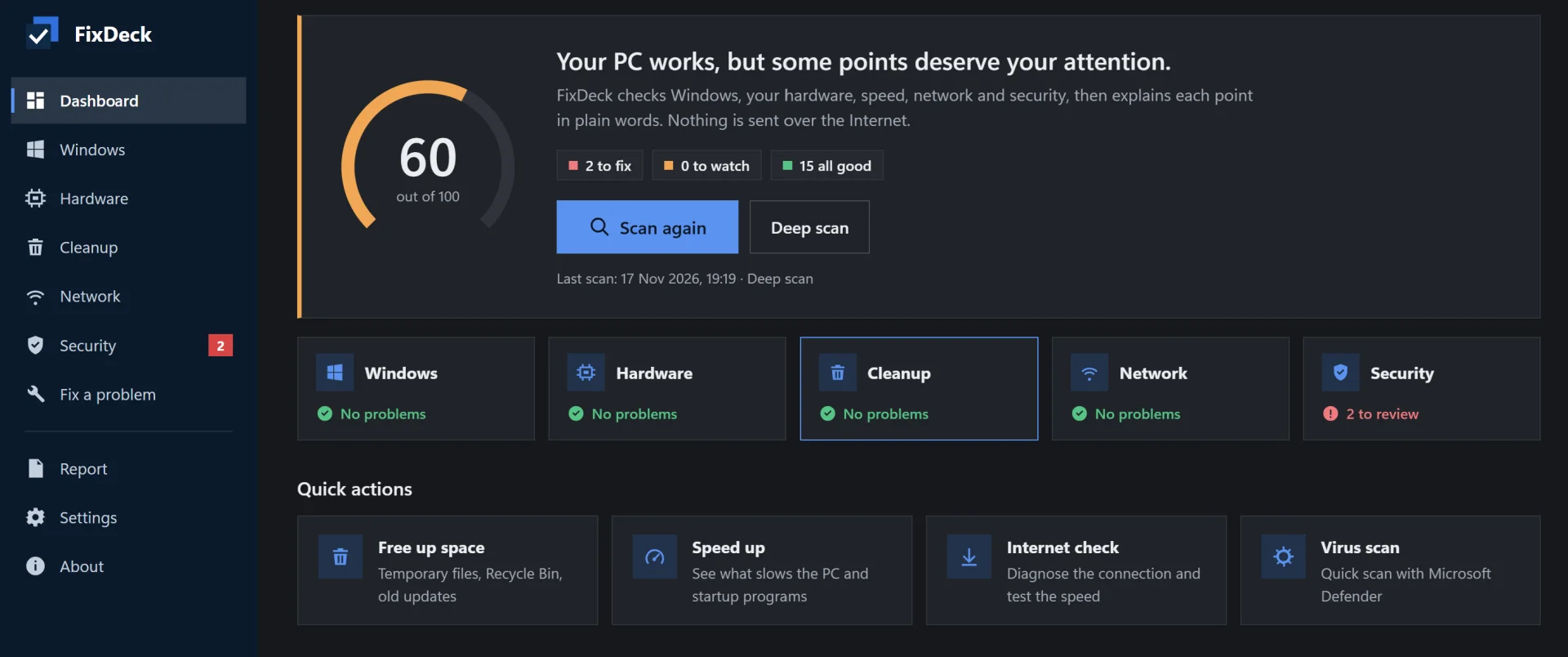
One click checks your whole PC: Windows system files, disks, memory, battery, startup programs, network, antivirus, firewall and updates. You get a health score out of 100 and a clear list of what’s fine, what needs attention and what to do about it. There’s no jargon and no fake alarms.
FixDeck uses only the tools built into Windows, such as System File Checker, DISM, CHKDSK, Windows Update and Microsoft Defender. It never “cleans” the registry, deletes system files, turns off Windows services or downloads drivers from unknown websites. Before any repair that changes the system, it creates a restore point, explains what it will do and asks for your OK. Every action is logged, and many can be undone in one click.
If FixDeck finds something serious, such as a failing hard drive, it won’t try to fix it. It tells you to back up your files and see a repair professional.
FixDeck works offline. It sends no data, needs no account and has no subscription. You pay once and it’s yours.
Features
-
One-click health check. Get a health score out of 100, a status for each area (Windows, Hardware, Cleanup, Network, Secu
-
Health score over time. A chart shows how your PC’s health changes from scan to scan.
-
Windows repair. Check and repair system files and the Windows image (SFC, DISM), check the disk (CHKDSK) and test the me
-
Hardware health. See disk health, free space, memory, battery wear (with a full battery report), processor and graphics
-
Cleanup. Free up space from temporary files, the Recycle Bin, Windows leftovers and browser caches (Edge, Chrome, Brave,
-
Faster startup. See which programs start with Windows and turn them off or back on, the same way Task Manager does.
-
Internet troubleshooting. Run a step-by-step connection check and a download speed test. Flush the DNS cache, renew the
-
Security and updates. Check your antivirus, firewall, Windows Update, drivers and whether your Windows version is still
-
Guided assistants. Six step-by-step guides for common problems, such as no Internet, no sound, a printer that won’t prin
-
Safety first. FixDeck creates a restore point before system repairs, asks before every change, keeps a log of every acti
-
PDF report. Save a clear report to keep or to send to a technician.
-
English and French. Switch language instantly. Light and dark theme follow Windows.
-
Private. No account, no tracking and no data sent.
Details
- Current version
- 1.1.0 · released on 17 Nov 2026
- Supported platforms
- Windows
- Category
- Processing
- Minimum requirements
Operating system: Windows 10 or Windows 11, 64-bit or 32-bit
Processor: any processor that runs Windows 10 or 11
Memory: 2 GB RAM (4 GB recommended)
Disk space: about 50 MB
Display: 1024 × 768 or higher
Microsoft Edge WebView2 Runtime: already included with Windows 11 and up-to-date Windows 10. If it’s missing, the installer adds it automatically, which needs an Internet connection.
Administrator rights: needed to install FixDeck and for some repairs. Windows asks for permission each time.
Internet connection: not needed for scans or repairs. It’s only used for the speed test and for Windows Update checks.
Latest versions
Version 1.1.0 · Windows · 17 Nov 2026
New
Redesigned interface: a calmer, Windows-style look with one accent colour and clear cards. The light or dark theme follows Windows.
Health check dashboard:
a health score gauge;
one status card per section (Windows, Hardware, Cleanup, Network, Security);
quick actions: free up space, speed up, Internet check, virus scan;
a results list you can filter (“Problems only” / “Everything”).
Problem counters in the menu: sections with issues show a red or orange number.
Health score over time: a chart on the dashboard shows your score across your last scans and the change since the previous one.
Browser cache cleanup: empties the caches of Microsoft Edge, Google Chrome, Brave, Opera and Mozilla Firefox, which often take several GB. Passwords, history, cookies and bookmarks are never touched, and open browsers are left alone.
Subtle animations: the score counts up, the gauge draws itself and pages change smoothly. Animations turn off automatically if they are disabled in Windows.
Battery report that always works: when the Windows battery report isn’t available on a PC, FixDeck creates its own from the official Windows battery data. It needs no administrator permission and is written in the interface language.
Your last scan is kept: the dashboard and the PDF report show your latest scan, even after you close and reopen FixDeck.
Cleanup total: the space you will free up is shown and updates as you tick items.
Improvements
Restore points: if System Protection is off, FixDeck now offers to turn it on, with your consent, instead of failing without explanation. It can also check this setting without administrator rights.
Battery health: FixDeck now reads battery health directly from Windows when the system report is blocked. It shows “not measurable” when the PC doesn’t provide its original capacity.
Speed test: an unreachable test server is now detected in 8 seconds instead of more than 20.
Data file names in English: the files in %AppData%\FixDeck are now settings.json, action-log.jsonl, scan-history.jsonl and last-scan.json. Files from the previous version are renamed automatically, with nothing lost.
Fixes
The window no longer moves sideways with the mouse or touchpad. Only the content scrolls, vertically.
An empty “Nothing to report” card no longer appears at the top of the Cleanup page.
A PC whose battery state is “unknown” is no longer treated as a PC without a battery.
Clearing the DNS cache now asks for Windows permission, as recent versions of Windows 11 require.
License terms
The license terms set out in Article 4 of the terms of sale apply.
Frequently asked questions
What is FixDeck?
FixDeck is a troubleshooting assistant for Windows 10 and 11. It checks your whole PC in one click, gives it a health score out of 100 and explains in plain English what’s wrong and how to fix it.
Who is FixDeck for?
It’s for everyday users who aren’t computer experts. You don’t need any technical knowledge: every result comes with a simple explanation and a suggested action.
Is FixDeck a “PC cleaner” or “speed booster”?
No. FixDeck doesn’t promise to make your PC faster and doesn’t “clean” or “optimize” the registry, because that kind of tool can damage Windows. FixDeck finds real problems and fixes them with Windows’ own built-in tools.
Is FixDeck an antivirus?
No. FixDeck checks that your antivirus and firewall are turned on and up to date. It can also start a Microsoft Defender scan, but it doesn’t replace an antivirus.
Customer reviews
No reviews yet.
Reviews can only be left by customers who bought the app (verified purchase).